



Asking Claude about KI
Claude can read KI and answer questions about it in plain English. You type a question and get back an answer with the numbers it used, without building a report or exporting a spreadsheet first.
The link between Claude and KI is called Caisson AI. You connect it once, and after that Claude can look things up in KI whenever you ask, using your account and your permissions.
Connecting
Section titled “Connecting”Caisson AI is not in Claude’s connector directory. You add it yourself once, by address, and it stays on your account after that.
- In Claude, open Settings → Connectors.
- Choose Add custom connector, at the bottom of the connector list.
- Fill in the two fields and nothing else:
- Name —
Story KI MCP - URL —
https://mcp.story.ki.storyrenovations.com/mcp
- Name —
- Choose Add. The connector appears in the list, not yet connected.
- Choose Connect on it. You will be sent to the normal work sign-in page, the same one you use for email, and then back to Claude.
The name is only a label on your own list, so type it as written above and everybody’s settings screen reads the same way when somebody is helping you.
It is connected when the row reads Web · Custom, an authorization of Individual, and a check mark:
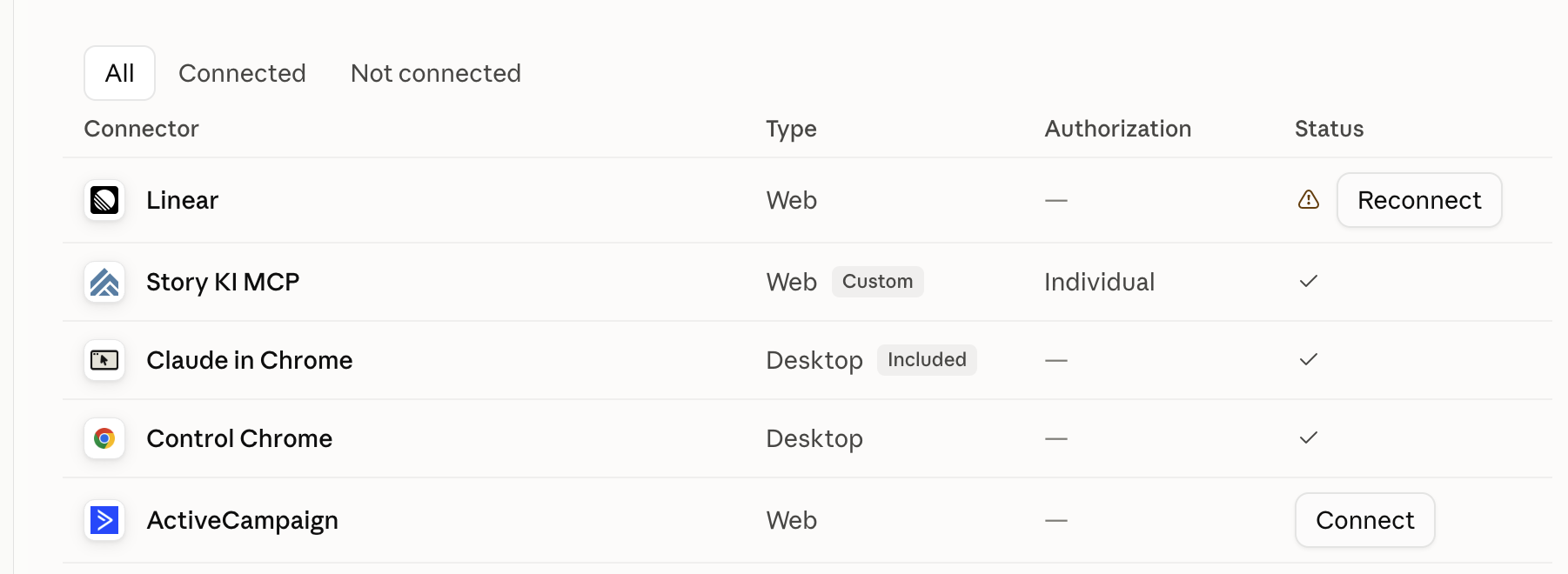
That is the whole setup. There is nothing to install, and no password or key to keep safe — the sign-in is what authorizes it, and it is yours rather than the company’s, which is why the authorization says Individual.
One connector, one company
Section titled “One connector, one company”Caisson AI reads one company’s KI. Every answer it gives is about that company, and every answer says which one.
Story and Bristlecone Construction run separate instances of KI holding separate numbers, so a connector is built per company. Story’s is the one that is switched on today, at the address above. Bristlecone Construction’s is not available yet, so everything on this page is about Story’s KI.
There is no company setting to get wrong, and no way to word a question so that it crosses from one company’s books into the other’s.
Why it asks you to sign in
Section titled “Why it asks you to sign in”Claude answers as you. Caisson AI looks up who you are, finds your KI user, and checks what you are allowed to see before it answers anything. Two people asking the same question can correctly get different answers, and neither of them is seeing something they should not. Every lookup is recorded against the person who asked.
What it can tell you
Section titled “What it can tell you”Seven areas of KI are readable through Claude today. Everything else in KI is still a screen you open yourself.
The questions under each area are patterns, not fixed phrases. Anything in italics is a stand-in: put your own job, vendor, division, month or number in its place. You do not have to match the wording, only the intent.
Estimates
Section titled “Estimates”Find past estimates without opening each job. Ask for every estimate, narrow the list to a job or division, or search an estimate’s name or number. Ordinary estimates, older versions and reusable templates are included. Ask for templates only, or exclude them, when that distinction matters.
- “List all estimates for the kitchen remodel on this job, including older versions.”
- “Show me the cost codes, quantities and markups on that estimate.”
- “List our reusable estimate templates.”
Large lists arrive in pages. Ask Claude to keep going until it has read every page before treating a list as complete. If someone edits the estimates during the lookup, ask for a fresh list.
Read the stored detail, with its context. An estimate belongs to the Project Record. A job can have separate Design and Construction contracts; an estimate found through either contract is not automatically that contract’s budget.
Detail includes cost codes, quantities, general items and markups, with the stored posting and spread flags. These sections are different views of the estimate, not amounts to add together. Unposted options and trend rows may be present. Claude does not calculate the final spread proposal price or return proposal PDFs from this lookup. Use the proposal in Legacy KI to confirm the price you intend to quote.
Your KI permissions must allow estimate reads. If the lookup is refused, ask a KI admin to check your access.
Projects and contracts
Section titled “Projects and contracts”Find a job the way you say it. The client’s surname, an address, a job number or a contract number all work, and Claude returns the Project Record with its contracts underneath. When more than one job matches, it lists the candidates rather than picking one, so a wrong guess never becomes a wrong number.
Open the record. Every contract on it with its amount, the job and contract numbers, scope, phase, status, dates and team.
Ask about the job, not the contract. A job with several contracts under it can be read whole — cost, invoices and WIP across all of them in one answer — rather than a contract at a time. Ask about a job and you get the whole job, not one half of it.
See the lists KI filters by. The cost-code hierarchy, the divisions and the contract groupings, so you can ask by the same names KI uses.
Allows you to ask questions like:
Find the client name job.
Which of our jobs are on street name?
What contracts sit under job number?
What has the whole client name job cost, across all its contracts?
Job costs
Section titled “Job costs”Cost to date, by project and by cost code. Ask for a period or ask for everything since the job began. Claude returns the totals and, when you ask for detail, the individual cost lines behind them, each with the vendor invoice it came from and whether that invoice has a scanned document.
Reclasses show both sides. A cost moved between jobs appears on both, marked as a reclass, rather than as an unexplained line on one of them.
Ask for the largest, not the latest. Cost lines can be ranked by amount instead of read in date order, narrowed to an account — subcontractor, materials — and filtered by what has been approved but not yet exported to QuickBooks. On a contract with hundreds of lines that is the difference between one answer and paging through the ledger.
Allows you to ask questions like:
What has project name cost to date, by cost code?
Show me every cost line on that contract from month.
What is the largest subcontractor line on the client name job, and whose invoice is it?
Which of those invoices have not been exported to QuickBooks?
Billing, payments and change orders
Section titled “Billing, payments and change orders”The money side of one contract. Contract amount, billed to date, received, outstanding and retention held, with the pay applications and change orders that produced them. Received is stated twice on purpose — as KI records it, and as the sum of the payments entered — because on a partly paid pay application KI records zero, so the two can differ and the difference is the finding.
Billed is stated twice for the same reason. The figure Claude leads with adds up what each pay application actually billed. Alongside it sits the certified figure — the running total carried on the latest pay application — which KI does not maintain on every contract, and which stayed at zero on contracts written since early 2026 even where real billing had gone out and been paid. Where the two agree, they agree to the cent. Where they do not, Claude reports both and names the difference rather than choosing.
The Fee is on the answer. It is the running total of the contract’s budget fees, which is the figure KI’s own margin analysis carries forward, so it no longer has to be added up by hand from the budget lines.
Cost control on the same call. Ask for it and each cost code carries its actual, budget, forecast and committed figures, with the date the budget snapshot was taken.
Change orders say whether they are executed. Approved and dated is executed; published without a date is not.
Allows you to ask questions like:
Where does the contract name contract stand — billed, received, outstanding?
What change orders are on it, and which are executed?
Show me cost control for that contract, budget against actual.
Checking a contract’s books
Section titled “Checking a contract’s books”Ask Claude to check a contract. It runs the consistency checks a reviewer would run by hand and reports findings with a severity: does the schedule of values add up to the contract amount, do the budgets plus fee and contingency, do internal adjustments net to zero, does each pay application carry forward from the last, is any cost sitting on an unmapped code, and has anything been approved but not exported, or exported without a QuickBooks id.
Or check a whole division. Leave the contract out and Claude runs the portfolio checks across every contract in a division.
Allows you to ask questions like:
Check the books on the contract name contract.
Anything wrong across division name?
The monthly close
Section titled “The monthly close”Calculate WIP from KI. Ask for the WIP schedule directly, for one contract or a division. It uses cumulative costs from the start of the job through the cutoff date and the current forecast basis, which the answer states explicitly.
Check what is missing. Incomplete or invalid inputs leave calculated money and percentage fields unavailable. The answer names the source-data issue so accounting can resolve it. A missing grouping or unmapped cost does not become an assumed value.
Read a large schedule in pages. Follow the next page to continue through the same retained result. Detailed source amounts are available when requested.
A division totals in one answer. The totals cover every contract the question matched, not just the page being read, and they say how many of those contracts could be calculated and how many could not. Contracts with incomplete inputs contribute nothing rather than counting as zero, so a division total is WIP for the calculable part of the division and says as much. On a division where nothing can be calculated the totals come back unavailable, which points at the source-data issue rather than hiding it behind a number.
QuickBooks comparison and reconciliation workpaper exports are not available on the Story connector. These answers use KI data and still need accounting review.
Allows you to ask questions like:
Calculate WIP for division name as of date.
Which contracts have incomplete inputs, and what needs correcting?
Show the next page.
Vendor invoices
Section titled “Vendor invoices”Find an invoice of any age. Ask by vendor, project, invoice number, amount, status, paid or unpaid, division, or a range of dates, and Claude looks across every invoice you are allowed to see. No screen does this today: the approval list shows what is waiting on you, the approved list looks back seven days, and the search box on it filters the rows already on screen. If a vendor’s last invoice arrived in March, Claude is the only place you can find it.
Say which date you mean. “Invoices from June” means the invoice date to a project manager, the date accounting received it to AP, and the date it was paid to whoever is reconciling. Ask for the one you want: received, invoice, due, paid or approved. Claude filters on that one and says so in the answer, because choosing for you is how you get a wrong answer that looks right.
Open one invoice. Claude returns the coded lines behind it: cost code, general ledger account, description, quantity, amount and retention, with the terms, the dates, and whether it has been exported to QuickBooks.
See what happened to it. Claude lists who approved, who rejected, who it was delegated to, and when. This is the one that answers “why has this not been paid yet”.
Read the scanned document. Ask Claude to read a page of the original invoice. It receives an authorized page image through the connector. You can also open the document in the Story viewer while signed in. Download links expire and require authentication; a plain browser click on a download link is not the same as opening the viewer.
Save several original PDFs at once. Find the invoices you need, then have Claude save their original attachments in groups of up to ten — “find the framing invoices on this project and save their original PDFs, ten at a time.” It uses the same invoice permissions as everything else.
Each group carries a four MiB limit on file content. Ask for too much and Claude is told which invoices to retry in a smaller group, so nothing is dropped silently; a single file over four MiB has to be opened in the Story viewer instead. Missing files are reported rather than skipped. What you get back is the original attachment — it is not confirmation that the invoice’s coding or payment status is right.
You see the invoices you are allowed to see. Accounting and administrators see all of them; everyone else sees the invoices on projects they lead, plus anything delegated to them. Claude says when a result has been narrowed that way, so a short list reads as “scoped to you” rather than “there are none”.
Allows you to ask questions like:
Find every invoice from vendor name this year.
Unpaid invoices on project name over amount.
Which invoices did we receive in month that are still waiting on approval?
Show me invoice number.
Why has that one not been paid?
Open the scan.
Find the trade invoices on this project and save their original PDFs, ten at a time.
Reading the answers
Section titled “Reading the answers”Check the company, the period and the basis. Every answer says which company it read, which dates it covers, and how current each source is. The company comes from the connector rather than from your question, so if it is not the one you meant, you are on the wrong connector rather than in the wrong period.
KI is the source. A QuickBooks export status on a KI record does not prove that the two systems reconcile. The connector does not read QuickBooks balances.
“Unresolved” is a real answer. If some differences cannot be matched, Claude lists them rather than making the gap go away. A close that ends with a short review list is working correctly.
What it will not do
Section titled “What it will not do”It cannot change anything in KI or in QuickBooks. No posting, reversing, approving or paying. This is enforced by permissions rather than by asking Claude nicely, so it holds even when someone asks it to do otherwise.
It does not do the arithmetic. KI calculates the totals, the matching and the WIP formulas, and hands them to Claude finished. Ask the same question twice and you get the same numbers.
It does not guess. Unmatched is reported as unmatched, and a stale source is called out in the answer.
Invoice search does not search the scan text. It searches the invoice record: vendor, project, number, amounts, cost codes, dates and status. Claude can read a requested page, but a word appearing only on a scan is not indexed for invoice search.
Invoices means vendor invoices. An invoice here is what the company pays out to trades and suppliers. What the company bills the client is a pay application, and those are read through the contract’s billing rather than through invoice search.
It cannot move an invoice along. No approving, rejecting, delegating, coding or paying. Those stay where they are, in KI, with the person whose approval they need.
It does not replace the close. Accounting still reviews the source records, resolves exceptions and performs the reconciliation.
When something is not right
Section titled “When something is not right”Claude says it cannot find you, or that your account is ambiguous or shared. Your sign-in worked but could not be matched to exactly one KI account. Usually a retired or shared account carries the same address. The refusal now says which of those it is. Ask the KI administrator to check the account match and correct the link. Reconnect once the account issue is resolved.
Claude says you do not have permission. Ask your KI administrator to check your account and access to the information you requested. Include the message Claude returned and which project or record you were trying to read.
Claude asks which contract you mean. A job and a contract are numbered separately in KI and the two ranges overlap, so the same number can mean either. Rather than guessing, Claude names the job it recognised and lists the contracts underneath it for you to choose from. Answers given before 17 September 2026 did guess: a job number handed to a question about cost or WIP could be read as a contract number and return a different job’s figures under that job’s name. If you acted on a cost or WIP figure from Claude before that date, ask again — check the job name on the answer against the one you asked about.
The answer is about the other company. Each connector reads one company, and Story’s is the only one switched on, so an answer about Bristlecone Construction is not something to work around — raise it. Nothing you can type will make one connector answer for the other, which is the point.
An invoice you know exists does not come back. Either it sits on a project you do not lead and have no delegation for, in which case Claude will say the results were narrowed to you, or the filter missed it — a range on the received date will not match an invoice you are thinking of by its invoice date. Vendor and invoice number are the two narrowest things to ask by, so try those.
When you need Claude to do something
Section titled “When you need Claude to do something”Caisson AI reads. Anything that creates or changes something runs through a
separate tool, a command line called ki, so that the connector anybody in the
business can use cannot alter anything.
ki is aimed at people building automated workflows, and everything it does
lands as a draft for a person to review. The first thing it does is start an
estimate from a template. Talk to engineering rather than working from this
page.